
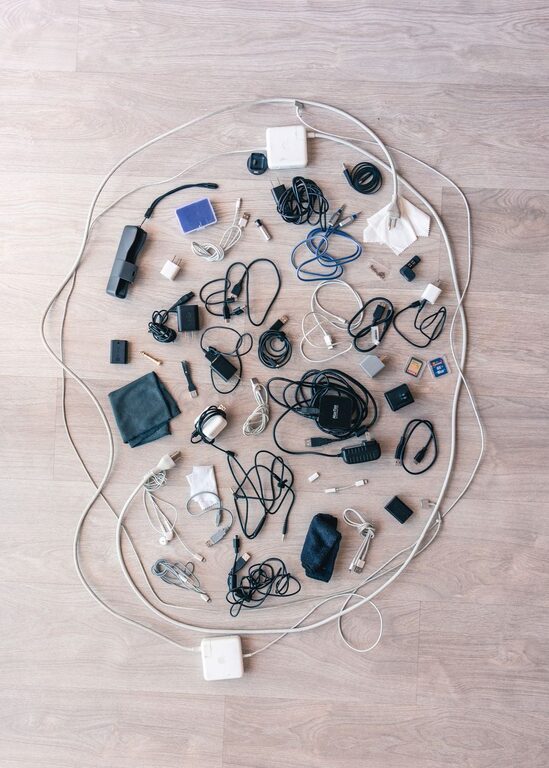
Cables and chargers have a way of spreading across desks, drawers, nightstands, and countertops. A few charging cords can quickly become a tangled pile, making it difficult to find the right cable when you need it. With a simple system, you can keep cords neat, easy to identify, and ready to use.
The goal is not to hide every cable. Instead, create a storage method that fits your daily routine. Frequently used chargers should stay within easy reach, while spare and specialty cables can be stored out of sight.
Start by Gathering Everything
Before organizing, collect all your cables, chargers, adapters, and power strips in one place. Check desks, drawers, bags, shelves, and rooms throughout the home. Seeing everything together makes it easier to understand what you have.
Create a clear workspace, such as a table or the floor, and separate the items into basic groups:
– Phone and tablet charging cables
– Laptop and computer chargers
– Audio and video cables
– Camera and gaming cables
– Extension cords and power strips
– Adapters and small accessories
– Cables you cannot identify
Do not worry about perfect sorting at this stage. The first step is simply to remove cables from scattered locations and place them where you can review them.
Test and Remove Unused Cables
Many people keep cables because they might be useful someday. However, damaged, outdated, or duplicate cables take up valuable space and make organization harder.
Inspect each item for:
– Frayed or exposed wires
– Bent or cracked connectors
– Loose plugs
– Burn marks or unusual damage
– Cables that no longer work
– Chargers that belong to devices you no longer own
Set aside any cable that appears damaged. If you are unsure whether a charger or cord is safe to use, avoid using it and follow local recycling or disposal guidance.
Next, identify duplicates. You may not need six similar charging cables, especially if you use only a few devices regularly. Keep a reasonable number of spares and place them in a separate backup category.
For cables that still work but are no longer needed, consider donating them if appropriate or recycling them through an electronics recycling program.
Sort Cables by Purpose
After removing unwanted items, group the remaining cables by how they are used. Sorting by purpose is usually more helpful than sorting only by appearance.
For example, you could create these groups:
Daily-use charging cables
Keep the cables you use every day together. This might include a phone cable, a tablet cable, and a smartwatch charger. Store them near your desk, bedside table, or another regular charging area.
Work and computer cables
Place laptop chargers, monitor cables, keyboard cables, and other computer accessories in one section. This makes it easier to set up or move a workspace.
Travel cables
Create a small travel kit with one or two essential chargers, adapters, and a compact power strip. Keeping these items together means you will not need to search through your main storage area before every trip.
Specialty cables
Cables for cameras, printers, older devices, speakers, or gaming systems can be stored separately. Since they are used less often, place them in a labeled box or container.
Use Simple Cable Management Tools
You do not need expensive equipment to keep cables organized. A few basic tools can make a noticeable difference.
– Reusable hook-and-loop ties: These are easy to adjust and work well for most cables.
– Cable clips: Attach them to the edge or underside of a desk to guide cords neatly.
– Small pouches: Use pouches for travel cables, adapters, and other small accessories.
– Storage boxes: Choose separate boxes for daily-use, backup, and specialty cables.
– Labels: Mark cables or containers so you can identify them quickly.
– Cable sleeves: Group several cords together along a desk or entertainment center.
– Drawer dividers: Keep short cables and chargers from mixing together.
Avoid tying cables too tightly, especially around the connector ends. Tight bends can damage the internal wires over time. Instead, coil cables loosely in a shape that does not strain the connectors.
Label Cables Clearly
Labels are especially useful when several cables look similar. You can label the cable itself, the storage pouch, or both.
Useful label examples include:
– Phone charger
– Tablet charger
– Laptop power
– Monitor
– Camera
– Travel
– Backup
– Unknown device
For a quick solution, use small adhesive labels or pieces of masking tape. If you want a cleaner appearance, use writable cable tags or colored markers.
Color coding can also help. For example, use one color for work cables, another for travel cables, and a third for entertainment devices. Keep the system simple so it remains easy to remember.
Create a Charging Station
A dedicated charging station prevents chargers from moving around the home. It can be as simple as a small tray on a desk or as organized as a charging shelf with separate spaces for each device.
Choose a location near an outlet and consider the following setup:
- Place a power strip where it is easy to reach but not in the middle of a walkway.
- Add a small tray, box, or organizer for charging devices.
- Use cable clips to guide each cord toward its regular position.
- Label each cable if several connectors are similar.
- Leave enough room for devices to rest safely while charging.
A charging station works best when every item has a clear place. When you finish charging a device, return the cable to its position instead of leaving it on a nearby surface.
Manage Cables Behind a Desk
A desk can look much cleaner when cables are routed along the back or underside instead of hanging loosely. Start by identifying which cables must remain connected and which can be unplugged after use.
Bundle cables that travel in the same direction, but do not combine every cord into one large bundle. Keeping power cables separate from smaller signal or charging cables can make troubleshooting easier.
Use adhesive cable clips, reusable ties, or an under-desk cable tray. Leave a little extra length near each device so you can move it without pulling on the cord.
Also keep power strips off the floor when possible. Mounting them beneath a desk or placing them in a ventilated cable box can reduce clutter, but make sure the area remains accessible and does not trap excessive heat.
Store Cables in a Drawer or Box
A drawer can be an excellent cable storage area if it includes dividers. Without dividers, cords often become tangled and difficult to identify.
Arrange cables by type or frequency of use. Place daily-use items toward the front and backup cables toward the back. Coil each cable loosely and secure it with a reusable tie before storing it.
If you prefer boxes, use small containers inside a larger bin. One container can hold charging cables, another can hold adapters, and a third can hold specialty cords. Clear containers make it easier to see what is inside, while labeled containers work well when stored on a shelf.
Maintain the System
Cable organization is easier to maintain when you make it part of your routine. Once a month or every few months, take a few minutes to review your collection.
Ask yourself:
– Are any cables damaged?
– Have you added new devices?
– Are there unused duplicates?
– Is the charging station still convenient?
– Can you identify every stored cable?
Return cables to their assigned locations after use and avoid creating temporary piles. If a storage method repeatedly becomes messy, change the method rather than blaming yourself. The best organization system is one that matches how you actually use your devices.
With a few categories, simple labels, and a dedicated storage place, cables and chargers can become much easier to manage. A small amount of setup now can save time and reduce clutter every day.